-
In today's digital age, many of us spend long hours at a desk, often hunched over computers or staring down at screens. While this sedentary work environment has its conveniences, it can also lead to a common ailment: neck pain. Neck pain associated with desk jobs is a prevalent issue that can affect productivity and overall well-being. Fortunately, there are effective strategies to combat neck pain by making ergonomic changes to your workspace and daily habits.
Understanding the Problem
Before diving into solutions, let's understand why desk jobs contribute to neck pain. Prolonged sitting and poor posture are major culprits. When we sit for hours with improper ergonomics, such as a poorly positioned monitor or an uncomfortable chair, it puts strain on our neck muscles and cervical spine. Over time, this strain leads to stiffness, discomfort, and sometimes even chronic pain.Ergonomic Solutions for Neck Pain Relief
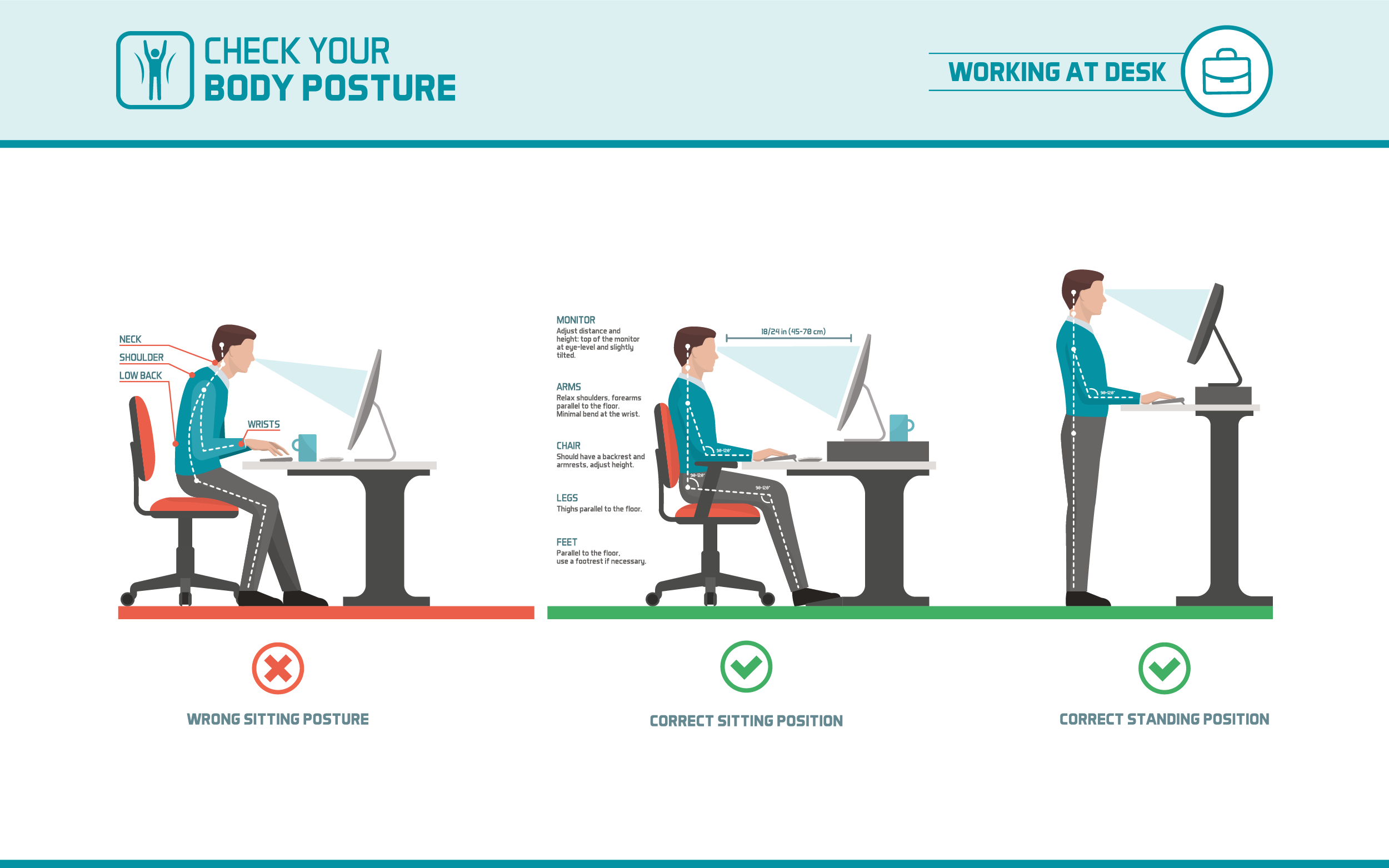
Optimize Your Workstation: Start by adjusting your chair height so that your feet are flat on the floor and your knees are at a 90-degree angle. Your computer monitor should be at eye level, directly in front of you, to avoid tilting your head up or down.Use Proper Keyboard and Mouse Positioning: Keep your keyboard and mouse close to your body to avoid reaching or stretching. Your wrists should be in a neutral position, not bent upward or downward.
Take Regular Breaks: Incorporate micro-breaks into your work routine. Every 30 minutes, stand up, stretch, and walk around for a few minutes. This helps reduce the continuous strain on your neck and muscles.
Practice Good Posture: Sit upright with your shoulders relaxed and your back against the chair. Avoid slouching or leaning forward, as this puts extra pressure on your neck and spine.
Invest in Ergonomic Accessories: Consider using ergonomic accessories such as a supportive chair, an adjustable monitor stand, or a keyboard tray. These tools can promote better posture and reduce strain on your neck and shoulders.
Adjust Your Lighting: Ensure that your workspace is well-lit to reduce eye strain. Dim or harsh lighting can cause you to lean in or squint, leading to neck and eye discomfort.
Incorporating Movement and Stretching
In addition to ergonomic changes, incorporating movement and stretching exercises can further alleviate neck pain:Neck Stretches:
Perform gentle neck stretches throughout the day to release tension in your neck muscles. Slowly tilt your head from side to side and forward and backward, holding each stretch for 15-30 seconds.
Shoulder Rolls:
Roll your shoulders backward and forward in a circular motion to loosen tight shoulder muscles.
Upper Back Stretch: Interlace your fingers and stretch your arms forward, rounding your upper back to counteract slouching.
By implementing these ergonomic changes and incorporating regular movement and stretching into your workday, you can combat neck pain associated with desk jobs. Remember, small adjustments can make a big difference in reducing strain on your neck muscles and promoting overall comfort and well-being. Prioritize your health and ergonomics to thrive in your workspace without the burden of neck pain.



Comments
- (no comments)